
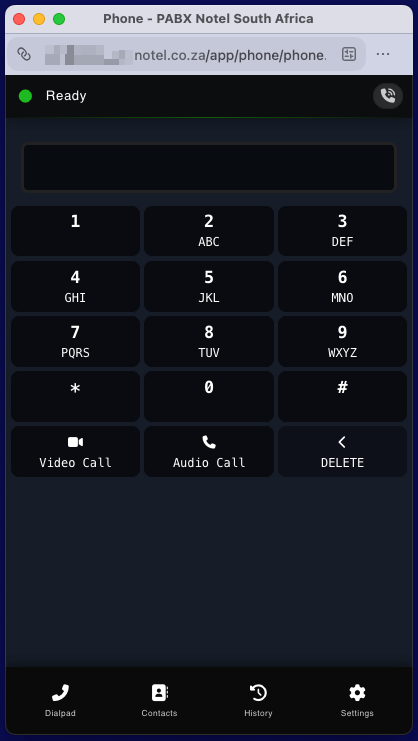
Make and receive business calls directly from your computer with the Notel Webphone. As part of the Notel cloud-based PABX phone system, the Webphone lets your team use their business number without relying on a physical desk phone.
Whether your employees work in the office, from home or across multiple locations, a business softphone gives them more flexibility in how they communicate with customers. With Notel, you can connect your calling devices to one business phone system and manage your communication through a central platform.
The Notel Webphone is free for Notel subscribers. Explore our business phone system to see how it can support your team’s communication needs.
What is a Business Softphone?
A softphone is software that allows you to make and receive telephone calls using a computer, smartphone or another supported device instead of relying on a traditional desk phone. It uses Voice over Internet Protocol (VoIP) technology to carry calls over an internet connection.
For businesses, a softphone provides a flexible way to use a business telephone number without being tied to a physical handset or office location.
Depending on the solution, a softphone can run as a desktop application, a mobile app or directly in a web browser. The Notel Webphone lets users make and receive business calls from their computer as part of the Notel cloud phone system.
If you’re comparing different communication options, learn more about VoIP for businesses in South Africa and how internet-based telephony works.
Why use a Softphone for Business?
A business softphone can help companies simplify their communication setup, support flexible working and reduce their reliance on dedicated desk phones.
Work from anywhere
Your team doesn’t have to be in the office to stay connected. Employees can make and receive business calls from supported devices wherever they have a suitable internet connection.
This is particularly useful for remote employees, hybrid teams and businesses with people working across multiple locations.
Reduce the need for desk phones
Not every employee needs a dedicated physical telephone. A softphone allows employees to use their computers for business calls, potentially reducing hardware costs and simplifying your office setup.
You can still combine software-based calling with physical handsets for employees who prefer a traditional telephone.
Keep business calls professional
Using your business phone system helps employees communicate with customers through their professional business number rather than relying on their personal mobile numbers.
With Notel, your team can use the calling options supported by their setup while keeping business communication separate from personal calls.
Manage calls through one system
A softphone works particularly well when it’s connected to a complete business phone system. Depending on your configuration and subscription, your team can benefit from features such as call forwarding, voicemail, call routing and availability management.
Explore the Notel PABX phone system to discover the calling features available to your business.
Support growing and distributed teams
As your business grows, your communication requirements change. A cloud-based phone system makes it easier to accommodate employees working from different locations without depending entirely on traditional office telephony equipment.
How does the Notel Webphone work?
The Notel Webphone connects your computer to your business phone system, allowing you to make and receive calls through your Notel calling service.
1. Choose your Business Phone System
Start with a phone system that suits your company’s communication requirements. Notel provides a cloud-based PABX solution that connects users, devices and business calling features.
2. Access the Notel Webphone
Use the Webphone through its supported setup on your computer. Your account and device must be configured correctly to use the service.
3. Make and receive business calls
Once configured, you can use your business phone system to communicate with customers and colleagues through the Webphone.
4. Manage your availability
Use the features available in your Notel setup to manage your business calls and availability.
The Webphone is one of several ways to connect to the Notel platform. You can also explore the Notel mobile VoIP App if you need business calling on your smartphone, or consider a physical VoIP desk phone for employees who prefer dedicated hardware.
What do you need to use a Business Softphone?
Before choosing a softphone, consider the following requirements.
- A business phone system: You’ll need a compatible calling service that supports your chosen softphone.
- A suitable device: Check that your computer or other device supports the software you intend to use.
- An internet connection: VoIP calls rely on internet connectivity, so connection quality can affect call quality and reliability.
- A microphone and speakers or headset: A suitable headset can improve audio quality and make frequent business calls more comfortable.
- The correct account configuration: Your device must be configured to connect to your business phone system.
A softphone can reduce the need for physical telephone hardware, but it doesn’t remove the need for reliable connectivity. Businesses that depend on incoming calls should also consider appropriate fallback arrangements in case a device or internet connection becomes unavailable.
For more information about the equipment involved, read our guide to VoIP hardware and business calling devices.
What does a Business Softphone Cost?
The cost of a business softphone depends on the provider and the phone system it connects to.
The Notel Webphone is free for Notel subscribers. The underlying phone system subscription and its included features are priced separately, so it’s important to consider the overall cost of your business communication setup rather than the software alone.
Notel offers different pricing options to suit business requirements. Visit our business phone system pricing page to explore the available packages and current rates.
When comparing solutions, consider what’s included in the subscription, how calls are billed, which features your team needs and whether you need additional devices or hardware.
Choose a Business Phone System that works for your team
Your business phone system should support the way your team works, whether employees are based in one office, work remotely or move between locations.
With Notel, you can connect supported calling devices to a cloud-based phone system and choose the setup that fits your business.
The Notel Webphone offers a practical way to make and receive business calls from your computer, without requiring a dedicated desk phone for every user.
Contact Notel to discuss the right business phone setup for your team.